
Salem County Same-Day Arrest Reality
No official Salem County Sheriff page posts a today-only list. There is no last-24-hours or last-48-hours arrest feed either. Instead, the sheriff's corrections pages point the public to the DSI-ITI Inmate Lookup. That portal is an official-linked query tool. It searches for people by name or number. It never returns a dated batch of new arrests.
The difference matters more than it sounds. A roster hit can confirm a current or recent booking. The screen never says when data was last refreshed. There is no stated service standard for intake, photo processing, nights, weekends, or holidays. Calling it a 24-hour feed would promise a precision Salem County has never made.
The Salem County Corrections page names the Salem County Correctional Facility as the local detention setting. Its public mission notes that people may be held there for alleged violations. Booking status and final court result remain separate matters.
Check Salem County Arrests Today
Start with the roster. Then confirm by phone. Search narrowly enough to tell apart people with similar names, but do not spread private identifiers around. The booking number is the handiest reference when the facility or a records custodian needs to pull one arrest record.
- Open the official DSI-ITI roster and choose the name-search mode.
- Enter first and last name. Add date of birth only when needed to separate similar matches.
- Search current custody first, then repeat with “Include released inmates” checked.
- Open a likely row and compare the booking number, commitment date, location, and release field.
- If the result is missing or unclear, call SCCF at 856-769-4300 and ask which custody system should be checked.
The number search takes a booking number. It also takes a permanent number or State ID. County ID, FBI number, and ICE number work too. Having one of those identifiers does not tell you where the arrest happened. The profile lists county, current location, arresting agency, and court as separate facts.
For the fuller county record path, use the Salem County recent-arrests hub. It covers booking photos and record requests. A same-day question should stay tight on present status and a traceable booking reference.
Salem Arrest Roster Fields
The result row is just the surface. It holds enough data to spot the right booking. Open the profile behind it and you get bond, charge, custody, and hearing details.
| Field | What it can establish |
|---|---|
| Name and DOB | Helps distinguish people with similar names. |
| Booking and permanent numbers | Connects a result to an intake record. |
| Commitment or release date | Shows a custody timeline when populated. |
| Photo | May appear after processing; it is not proof of guilt. |
| Bond and charges | Shows booking-stage entries that may change in court. |
| Housing, location, detainer | Shows custody data that can change. |
The portal also shows descriptive and identifier fields. Do not copy them just because they are visible. Use only what confirms identity and custody. For how a case ends, court records, not the roster charge block, hold the answer.
Note: A projected release date is an estimate inside a custody record, not a court judgment or a promised release time.
When Salem Arrest Photos Appear
An official profile can show thumbnails plus a larger booking image. Salem County publishes no rule for how fast that image appears after an arrest. Intake may involve identity checks plus record entry and classification. Image processing takes time too. So no exact wait should be inferred. How long until the mugshot appears? The honest answer is that the exact time stays unpublished.
Check again later or call SCCF. Do not swap in an unofficial photo page for a missing official result. A copied image may be old or mislabeled. It can also go stale after custody changes. The official search screen is a blank query form, not a gallery of real people. Open the official Salem County inmate lookup to run a current search.
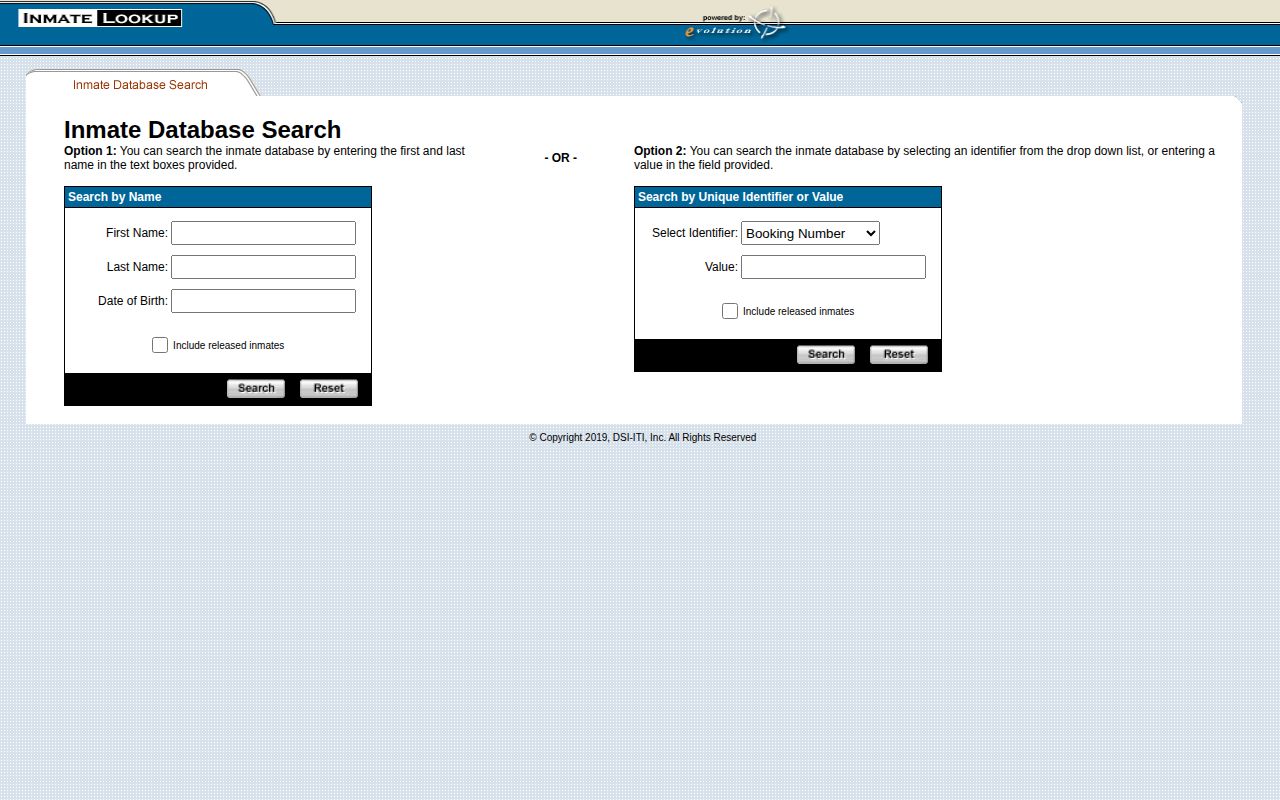
The released-inmates control widens the query. The interface never says how far back its online records reach.
Salem Released-Arrest Search Limits
The "Include released inmates" option helps when someone has left current custody. It can surface a recent past booking without turning the roster into an archive. Salem County has set no fixed number of days that released entries stay searchable.
Online display and government retention are two different things. A record can quietly drop off the public search interface. The underlying booking file remains. It sits under an approved New Jersey retention schedule. Correction, sealing, expungement, or another legal restriction can also remove it. When a record goes missing, file a narrow county OPRA request. Give the person's name and approximate date. Add the arresting agency and booking number if known.
A released person may still have an open court case. Charges can be dismissed, downgraded, diverted, resolved by plea, or end in acquittal. The roster never replaces the disposition.
Confirm a Salem County Arrest
When a result is missing, match the fallback to the question. Present county custody belongs with SCCF. Expected release or transfer alerts belong with New Jersey VINE, court outcomes with NJ Courts, and state-prison custody with NJDOC.
- Call Salem County Correctional Facility at 856-769-4300 for a time-sensitive county custody question.
- Call the Sheriff’s Office at 856-935-7510 when the correct local channel is unclear.
- Use the Salem County OPRA page for a booking record or photo not online.
- Use New Jersey VINE for notifications after locating a person.
- Use NJ Courts for the later public case and disposition.
No Salem Sheriff app exists on the sheriff's pages. New Jersey VINE works on the web and on phones. Yet it serves the whole state as a custody-alert tool rather than a Salem same-day arrest list. Once you land a solid match, the VINELink Custody Check can set up alerts. Those alerts cover later release or transfer. For department summaries spanning several days, the Salem County Police Blotter is the better fit. It trades live custody data for a wider news window. That window covers Salem County arrests.
Official Salem Arrest Sources
Start with the officials. The sheriff site sets out the agency and its corrections path. The roster gives you the direct arrest search. The county OPRA page opens a request route when the interface comes up empty. Salem County arrest records deserve that order before any news feed or commercial republication. Begin at the Salem County Sheriff home page. You can navigate from there.

The sheriff page confirms the agency context, while DSI-ITI remains the actual person-search interface.
Location labels can mislead. A county field in one profile did not clearly answer the Salem question, so trust the arresting agency and the court docket to settle where an arrest truly belongs.
Salem Arrest Timing Checkpoints
A same-day arrest search actually crosses several distinct moments. The arrest itself is the police event. Booking follows at the jail, creating a number, a custody record, and the booking photo. Commitment and release dates arrive later as custody fields. A news article or court filing can trail all of them. Salem County publishes no service standard that welds these moments into one guaranteed timeline.
That gap is why careful searchers repeat the work. A profile missing early in the day may surface once intake data reaches DSI-ITI. Someone else may never appear at all. A summons closed the matter without detention. A third person was booked and released before the first search even ran. The released-inmates checkbox helps with that last case. Salem County publishes no roll-off interval for its results.
| Checkpoint | Best source | What remains uncertain |
|---|---|---|
| Reported arrest | Arresting police agency | Whether detention followed |
| County intake | DSI-ITI roster or SCCF | Exact public posting time |
| Release or transfer | Roster, SCCF, and VINE | Whether all systems updated together |
| Charge outcome | NJ Courts | Not decided by the booking entry |
Match each source to its checkpoint. That habit stops a delayed profile from reading as proof that no arrest happened. It also keeps an old booking photograph from passing as current custody.
Which date answers a last-24-hours question? The arrest date tells you when police acted. The commitment or booking date marks jail intake. The release field signals a custody change. When dates conflict or a field sits blank, ask SCCF or the arresting agency to identify the source record. Never swap a news publication date for the booking date.